Tuesday, 4 December 2018

form dialog js sapui5


view:sap.ui.jsview("form.form", {


getControllerName : function() {
return "form.form";
},


createContent : function(oController) {
var oLayout1 = new sap.ui.layout.form.GridLayout();
var oLayout2 = new sap.ui.layout.form.ResponsiveLayout();
var oLayout3 = new sap.ui.layout.form.ResponsiveGridLayout();

var oForm1 = new sap.ui.layout.form.Form({

title: new sap.ui.core.Title({text: "Address Data"}),
layout: oLayout3,
formContainers: [
new sap.ui.layout.form.FormContainer({
title: "Person data",

formElements: [
new sap.ui.layout.form.FormElement({

label: "Name",
id:"fo",
fields: [new sap.ui.commons.TextField({
width:"150px",
   
}),
]
}),

new sap.ui.layout.form.FormElement({
label: "Age",
fields: [new sap.ui.commons.TextField({
width:"150px",
}),
         ]
}),
new sap.ui.layout.form.FormElement({
label: "Company",
fields: [new sap.ui.commons.TextField({
width:"150px",
     
}),
         ]
}),
]
}),

new sap.ui.layout.form.FormContainer({
title: " ",
formElements: [
new sap.ui.layout.form.FormElement({
label: "Date of Birth",
fields: [new sap.ui.commons.DatePicker({
width:"150px",
})
]
}),
new sap.ui.layout.form.FormElement({
label: "address",
width:"150%",
fields: [new sap.ui.commons.TextArea({
cols : 20,
rows : 5,

}),
         ]


})
]
}),
]


});
// Create the button which should open the dialog
var oButton = new sap.ui.commons.Button("button1",{
text: "Open",
press:function(){
openDialog();
}
});


// Function to create the dialog
function openDialog() {
var oDialog1 = new sap.ui.commons.Dialog();
oDialog1.setTitle("person data");
var oText = new sap.ui.commons.TextView({text: "name"});
oDialog1.addContent(oText);
oDialog1.addButton(new sap.ui.commons.Button({text: "OK", press:function(){oDialog1.close();}}));
oDialog1.open();
};

  return new sap.m.Page({
title: "Title",
content: [
oForm1,oButton
]
});
}
});
index.html:
<!DOCTYPE HTML>
<html>
<head>
<meta http-equiv="X-UA-Compatible" content="IE=edge">
<meta http-equiv='Content-Type' content='text/html;charset=UTF-8'/>

<script src="resources/sap-ui-core.js"
id="sap-ui-bootstrap"
data-sap-ui-libs="sap.m,sap.ui.commons,sap.ui.core"
data-sap-ui-theme="sap_bluecrystal">
</script>
<!-- only load the mobile lib "sap.m" and the "sap_bluecrystal" theme -->

<script>
sap.ui.localResources("form");
var app = new sap.m.App({initialPage:"idform1"});
var page = sap.ui.view({id:"idform1", viewName:"form.form", type:sap.ui.core.mvc.ViewType.JS});
app.addPage(page);
app.placeAt("content");
</script>
<style>
#fo{
color:red;
}
</style>
</head>
<body class="sapUiBody" role="application">
<div id="content"></div>
</body>
</html>
output:


SAPUI5 WITH OUT CSS FB XML


appview:
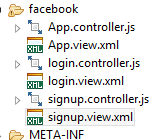
 <App id="app"></App>
controller login:
sap.ui.controller("fb.facebook.login", {

onPress: function(oEvent)
  {
  var oRouter = sap.ui.core.UIComponent.getRouterFor(this);
  oRouter.navTo("signup");
  }
loginview:
<core:View xmlns:core="sap.ui.core" xmlns:mvc="sap.ui.core.mvc" xmlns="sap.m"
controllerName="fb.facebook.login" xmlns:html="http://www.w3.org/1999/xhtml">
<Page title="Title">
<content>
<HBox class="hb1">
<VBox>
<Label text="facebook"  id="lb0" />
</VBox>
<VBox>
<Label text="EmailorPhone"  id="lb1" />
<Input width="80%" height="1em" id="tf1"/>
</VBox>
<VBox>
<Label text="password"  id="lb2" />
<Input  width="80%" id="tf2"/>
<Link text="Forgotten account?" href="#" id="fa"/>
</VBox>
<VBox >
<Button text ="log in" id = "loginbtn" />
</VBox>
</HBox>

<VBox>
<Label text="facebook helps you connect and share with the people in your life"  id="lb3" />
<Image  id="img1" src="https://static.xx.fbcdn.net/rsrc.php/v3/yc/r/GwFs3_KxNjS.png"/>
</VBox>
<VBox>
<Label text="Create an account"  id="lb11" />
<Label text="It's free and always will be."  id="lb22" />
</VBox>
<HBox>
<Input width="9em"   placeholder= "First name" id="fn1"/>
<Input width="9em"   placeholder= "Surname" id="sur1"/>
</HBox>
<VBox>
<Input width="18.6em"   placeholder= "Mobile number or email address" id="me1"/>
<Input width="18.6em"   placeholder= "New password" id="np1"/>
</VBox>
<VBox>
<VBox class="hbox29">
<Label text="Birthday"  id="lb24" />
</VBox>
<HBox>
<DatePicker id="dp20" value="{myDate}" />
<Label text="Why do I need to provide my date of birth?"  id="bt25" />
</HBox>
<VBox>
<RadioButtonGroup columns="2" class="radio">
<buttons>
<RadioButton id="rb1" text="Female"/>
<RadioButton id="rb2" text="Male"/>
</buttons>
</RadioButtonGroup>
<Label text="By clicking Sign Up, you agree to our Terms, Data Policy and Cookie Policy. You may receive SMS notifications from us and can opt out at any time."  id="lb23" />
<Button text ="Sign Up" id = "bt20"  width = "10em"/>
</VBox>
</VBox>
<Button text ="Sign Up2" id = "bt21"  width = "10em" press="onPress"/>
</content>
</Page>
</core:View>
signupview:
<core:View xmlns:core="sap.ui.core" xmlns:mvc="sap.ui.core.mvc" xmlns="sap.m"
controllerName="fb.facebook.signup" xmlns:html="http://www.w3.org/1999/xhtml">
<Page title="Title">
<content>
<VBox>
<Label text="Create an account"  id="lb11" />
<Label text="It's free and always will be."  id="lb22" />
</VBox>
<HBox>
<Input width="9em"   placeholder= "First name" id="fn1"/>
<Input width="9em"   placeholder= "Surname" id="sur1"/>
</HBox>
<VBox>
<Input width="18.6em"   placeholder= "Mobile number or email address" id="me1"/>
<Input width="18.6em"   placeholder= "New password" id="np1"/>
</VBox>
<VBox>
<VBox class="hbox29">
<Label text="Birthday"  id="lb24" />
</VBox>
<HBox>
<DatePicker id="dp20" value="{myDate}" />
<Label text="Why do I need to provide my date of birth?"  id="bt25" />
</HBox>
<VBox>
<RadioButtonGroup columns="2" class="radio">
<buttons>
<RadioButton id="rb1" text="Female"/>
<RadioButton id="rb2" text="Male"/>
</buttons>
</RadioButtonGroup>
<Label text="By clicking Sign Up, you agree to our Terms, Data Policy and Cookie Policy. You may receive SMS notifications from us and can opt out at any time."  id="lb23" />
<Button text ="Sign Up" id = "bt20"  width = "10em"/>
</VBox>
</VBox>
</content>
</Page>
</core:View>
Component.js:
sap.ui.define( ["sap/ui/core/UIComponent"], function (UIComponent) {
"use strict";
return UIComponent.extend("fb", {

metadata: {
"manifest":"json"

},

init : function () {
UIComponent.prototype.init.apply(this, arguments);

// Parse the current url and display the targets of the route that matches the hash
this.getRouter().initialize();
}

});
}, /* bExport= */ true);
manifest.json:
{
  "_version": "1.8.0",

  "sap.ui5": {

"models": {

},"rootView": {
"viewName": "fb.facebook.App",
"type": "XML",
"async": true
},
"routing": {
  "config": {
"routerClass": "sap.m.routing.Router",
"viewType": "XML",
"viewPath": "fb.facebook",
"controlId": "app",
"controlAggregation": "pages",
"async": true,
"bypassed": {
    "target": "notFound"
}
  },
  "routes": [
{
  "pattern": "",
  "name": "login",
  "target": "login"
},
{
  "pattern": "signup",
  "name": "signup",
  "target": "signup"
}
  ],
  "targets": {
"login": {
  "viewID": "login",
  "viewName": "login"
},
"signup": {
  "viewId": "signup",
  "viewName": "signup"
},
"notFound": {
"viewName": "NotFound",
"transition": "show"
},
"resources": {
            "css": [
                  {
                        "uri": "css/style.css"
                  }
            ]
      }

  }
}
  }
}

index.html:
 <!DOCTYPE HTML>
<html>
<head>
<meta http-equiv="X-UA-Compatible" content="IE=edge">
<meta http-equiv='Content-Type' content='text/html;charset=UTF-8'/>
<script src="resources/sap-ui-core.js"
id="sap-ui-bootstrap"
data-sap-ui-libs="sap.m"
data-sap-ui-theme="sap_bluecrystal"
        data-sap-ui-resourceroots='{
            "fb": "./"
         }'>

</script>
<!-- only load the mobile lib "sap.m" and the "sap_bluecrystal" theme -->

<script>
sap.ui.getCore().attachInit(function () {
            new sap.ui.core.ComponentContainer({
               name : "fb"
            }).placeAt("content");

         });

</script>

</head>
<body class="sapUiBody" role="application">
<div id="content"></div>
</body>
</html>
output:


Friday, 16 November 2018

FB JS SAPUI5

VIEW.JS
sap.ui.jsview("fb2.fb2", {

 
getControllerName : function() {
return "fb2.fb2";
},


createContent : function(oController) {
var Vbox = new sap.m.VBox({
id:"hbox1",

items:[
       new sap.m.Label({
       id:"lb0",
       text:"facebook"
       }),     
]
});
var Vbox2 = new sap.m.VBox({
id:"vbox2",
items:[
       new sap.m.Label({
       id:"lb1",
      text:"EmailorPhone",
     
       }),
       new sap.ui.commons.TextField({
       id:"tf1",
       
     
       }).addStyleClass("tf1"),
       ]
});
       var Vbox3 = new sap.m.VBox({
id:"vbox3",
items:[
     
       new sap.m.Label({
       id:"lb2",
      text:"password",
       }),
       new sap.ui.commons.TextField({
     
       }),
       new sap.m.Link({
       id:"fa",
                text : "Forgotten account?",
                href : "#",
               
       }),
       ]
     
       });
       var Vbox4 = new sap.m.VBox({
id:"vbox4",
items:[
   
        new sap.ui.commons.Button({
                id : "loginbtn",
                text : "log in",


                }),
     
       ]

}) ;

var oHBox1 = new sap.m.HBox({
id:"hb",
items:[
Vbox,Vbox2,Vbox3,Vbox4
]
});
var VBox5 = new sap.m.VBox({
id:"hbox5",
items:[
            new sap.m.Label({
                id:"lb3",
              text:"facebook helps you connect and share with the people in your life.",
             
            }),


            new sap.m.Image({
         id:"fbim",
         
        src:"https://static.xx.fbcdn.net/rsrc.php/v3/yc/r/GwFs3_KxNjS.png",
    }),
              ]
       });
var VBox10 = new sap.m.VBox({
id:"hbox10",
items:[
            new sap.m.Label({
                id:"lb11",
              text:"Create an account",
            }),
           
            new sap.m.Label({
            id:"lb22",
            text:"It's free and always will be.",
            }),
            ]
});
            var VBox12 = new sap.m.HBox({
    id:"hbox12",
    items:[
new sap.ui.commons.TextField({
                id:"fn1",
                width : '9em',
               
                placeholder: "First name",
            }).addStyleClass("fn1"),
            new sap.ui.commons.TextField({
                id:"sur1",
                width : '9em',
                placeholder: "Surname",
            }),
            ]
    });
            var VBox13 = new sap.m.VBox({
    id:"hbox13",
    items:[
            new sap.ui.commons.TextField({
                id:"me1",
                width : '18.6em',
                placeholder: "Mobile number or email address",
            }),
            new sap.ui.commons.TextField({
                id:"np1",
                width : '18.6em',
                placeholder: "New password",
           
    }),
              ]
       });
            var Hbox26 = new sap.m.VBox({
    id:"hbox26",
    items:[
                new sap.m.Label({
                    id:"lb24",
                  text:"Birthday",
           }),
           ]
    });
           var Hbox27 = new sap.m.HBox({
    id:"hbox27",
    items:[
           new sap.ui.commons.DatePicker({
           id:"dp20",
           }),
           new sap.m.Label({
                    id:"bt25",
                  text:"  Why do I need to provide my date of birth?",
                 
           }),
           ]
           });
           var Hbox28 = new sap.m.VBox({
    id:"hbox28",
    items:[
           new sap.ui.commons.RadioButtonGroup({
           id:"rb20",
            columns: 2,
    items: [new sap.ui.core.Item({text: "Female" }),
    new sap.ui.core.Item({text: "Male" })]
    }) ,
    new sap.m.Label({
                    id:"lb23",
                  text:"  By clicking Sign Up, you agree to our Terms, Data Policy and Cookie Policy. You may receive SMS notifications from us and can opt out at any time.",
           }),
           new sap.ui.commons.Button({
        id:"bt20",
        width : '10em',
           text : "Sign Up",
           }),
           ]
    });
         
           var Hbox29 = new sap.m.VBox({
    id:"hbox29",
    items:[
    Hbox26,  Hbox27,Hbox28 
    ]
           });
           
            var VBox16 = new sap.m.VBox({
    id:"hbox16",
    items:[
VBox10,VBox12,VBox13, Hbox29 
           
           
            ]
}); 
           
            var oHBox17 = new sap.m.HBox({
    id:"oHBox17",
    items:[
VBox5,VBox16
]
            })
  return new sap.m.Page({
title: "Title",
content: [
oHBox1, oHBox17
]
});
}


});
INDEX.HTML
sap.ui.jsview("fb2.fb2", {

 
getControllerName : function() {
return "fb2.fb2";
},


createContent : function(oController) {
var Vbox = new sap.m.VBox({
id:"hbox1",

items:[
       new sap.m.Label({
       id:"lb0",
       text:"facebook"
       }),     
]
});
var Vbox2 = new sap.m.VBox({
id:"vbox2",
items:[
       new sap.m.Label({
       id:"lb1",
      text:"EmailorPhone",
     
       }),
       new sap.ui.commons.TextField({
       id:"tf1",
       
     
       }).addStyleClass("tf1"),
       ]
});
       var Vbox3 = new sap.m.VBox({
id:"vbox3",
items:[
     
       new sap.m.Label({
       id:"lb2",
      text:"password",
       }),
       new sap.ui.commons.TextField({
     
       }),
       new sap.m.Link({
       id:"fa",
                text : "Forgotten account?",
                href : "#",
               
       }),
       ]
     
       });
       var Vbox4 = new sap.m.VBox({
id:"vbox4",
items:[
   
        new sap.ui.commons.Button({
                id : "loginbtn",
                text : "log in",


                }),
     
       ]

}) ;

var oHBox1 = new sap.m.HBox({
id:"hb",
items:[
Vbox,Vbox2,Vbox3,Vbox4
]
});
var VBox5 = new sap.m.VBox({
id:"hbox5",
items:[
            new sap.m.Label({
                id:"lb3",
              text:"facebook helps you connect and share with the people in your life.",
             
            }),


            new sap.m.Image({
         id:"fbim",
         
        src:"https://static.xx.fbcdn.net/rsrc.php/v3/yc/r/GwFs3_KxNjS.png",
    }),
              ]
       });
var VBox10 = new sap.m.VBox({
id:"hbox10",
items:[
            new sap.m.Label({
                id:"lb11",
              text:"Create an account",
            }),
           
            new sap.m.Label({
            id:"lb22",
            text:"It's free and always will be.",
            }),
            ]
});
            var VBox12 = new sap.m.HBox({
    id:"hbox12",
    items:[
new sap.ui.commons.TextField({
                id:"fn1",
                width : '9em',
               
                placeholder: "First name",
            }).addStyleClass("fn1"),
            new sap.ui.commons.TextField({
                id:"sur1",
                width : '9em',
                placeholder: "Surname",
            }),
            ]
    });
            var VBox13 = new sap.m.VBox({
    id:"hbox13",
    items:[
            new sap.ui.commons.TextField({
                id:"me1",
                width : '18.6em',
                placeholder: "Mobile number or email address",
            }),
            new sap.ui.commons.TextField({
                id:"np1",
                width : '18.6em',
                placeholder: "New password",
           
    }),
              ]
       });
            var Hbox26 = new sap.m.VBox({
    id:"hbox26",
    items:[
                new sap.m.Label({
                    id:"lb24",
                  text:"Birthday",
           }),
           ]
    });
           var Hbox27 = new sap.m.HBox({
    id:"hbox27",
    items:[
           new sap.ui.commons.DatePicker({
           id:"dp20",
           }),
           new sap.m.Label({
                    id:"bt25",
                  text:"  Why do I need to provide my date of birth?",
                 
           }),
           ]
           });
           var Hbox28 = new sap.m.VBox({
    id:"hbox28",
    items:[
           new sap.ui.commons.RadioButtonGroup({
           id:"rb20",
            columns: 2,
    items: [new sap.ui.core.Item({text: "Female" }),
    new sap.ui.core.Item({text: "Male" })]
    }) ,
    new sap.m.Label({
                    id:"lb23",
                  text:"  By clicking Sign Up, you agree to our Terms, Data Policy and Cookie Policy. You may receive SMS notifications from us and can opt out at any time.",
           }),
           new sap.ui.commons.Button({
        id:"bt20",
        width : '10em',
           text : "Sign Up",
           }),
           ]
    });
         
           var Hbox29 = new sap.m.VBox({
    id:"hbox29",
    items:[
    Hbox26,  Hbox27,Hbox28 
    ]
           });
           
            var VBox16 = new sap.m.VBox({
    id:"hbox16",
    items:[
VBox10,VBox12,VBox13, Hbox29 
           
           
            ]
}); 
           
            var oHBox17 = new sap.m.HBox({
    id:"oHBox17",
    items:[
VBox5,VBox16
]
            })
  return new sap.m.Page({
title: "Title",
content: [
oHBox1, oHBox17
]
});
}


});
INDEX.HTML
<!DOCTYPE HTML>
<html>
<head>
<meta http-equiv="X-UA-Compatible" content="IE=edge">
<meta http-equiv='Content-Type' content='text/html;charset=UTF-8'/>

<script src="resources/sap-ui-core.js"
id="sap-ui-bootstrap"
data-sap-ui-libs="sap.m,sap.ui.commons"
data-sap-ui-theme="sap_bluecrystal">
</script>
<!-- only load the mobile lib "sap.m" and the "sap_bluecrystal" theme -->

<script>
sap.ui.localResources("fb2");
var app = new sap.m.App({initialPage:"idfb21"});
var page = sap.ui.view({id:"idfb21", viewName:"fb2.fb2", type:sap.ui.core.mvc.ViewType.JS});
app.addPage(page);
app.placeAt("content");
</script>
 <style>
  #lb11{
font-size:35px;
font-weight:bolder;
margin-top:20px
  }
  #lb22{
  font-size:20px;
  margin-top:15px
  }
  #sur1{
  margin-left:12px;
    height: 35px;
    border-radius:5px;
    font-size:20px;
  }
  .fn1{
    border-radius:5px;
   
    height: 35px;
    font-size:20px;
 
  }
  #me1{
  margin-top:12px;
   border-radius:5px;
   font-size:20px;
   
            height: 35px;
 
  }
  #np1{
  margin-top:12px;
   border-radius:5px;
   font-size:20px;
   
            height: 35px;
  }


 #lb3{
word-wrap: break-word;
color: #0e385f;
    font-size: 23px;
    font-weight: bold;
    line-height: 29px;
    margin-top: 40px;
    width:537px;
    height:60px;
    word-spacing: 0px;
    white-space: normal;
    margin-left:200px;
}
#fbim{
    width: 537px;
    height: 195px;
    margin-left:200px;
}


 #lb0{
 color:white;
 font-size:40px;
 font-weight:bolder;
 padding-top:30px;
 padding-bottom:20px;
 padding-left:200px;
 }
 #hb{
 background:#415e9b;
 height:82px;
 border-bottom:1px soild #133783;
 }
 #lb1{
 color:white;
 }
 #lb2{
 color:white;
 }
 #vbox2{
  padding-left:500px;
  padding-top:20px;
 }
 #vbox3{
 padding-top:20px;
 margin-left:15px
 }
 #fa{
 color:#8fb1d8;
 }
 
 #loginbtn{
background:#4267b2;
border:1px solid #29487d;
border-radius:#2px;
color:#fff;
width:50px;
margin-top:40px;
margin-left:20px
 

 }
 #hbox16{
 margin-left:80px;
 }
 #hbox12{
 margin-top:15px;
 }
  #lb24{
 margin-top:10px;
 font-size: 18px;
 }
 #bt25{
 font-size: 14px;
    margin-left:15px;
    white-space:normal;
    font-weight: 200px;
    color: #365899;
    cursor: pointer;
    text-decoration: none;
    width:150px;
    height:30px;
    font-size: 11px;
 }
 #hbox27{
 margin-top:5px
 }
 #rb20{
 margin-top:8px;
 font-size:18px;
 line-height: 18px;
 font-weight: normal;
 font-family: inherit;


 }

 #lb23{
 white-space:normal;
 margin-top:10px;
     word-wrap: break-word;
      width:310px;
    height:60px;
    font-size: 11px; 
 }
 #bt20{
 margin-top:2px;
  border-radius:5px;
   
    height: 38px;
        background-color: #79bc64;
        font-size: 19px;
       width:50px;
            border: 1px solid;
     font-weight: bold ;
    color: #fff;
    cursor: pointer;
    display: inline-block
    min-width: 150px;
    padding: 7px 20px;
    text-align: center;
    box-shadow: inset 0 1px 1px #a4e388;
    border-color: #3b6e22 #3b6e22 #2c5115;
 }
  #dp20{
  width:155px;
  }
  #oHBox17{
  background:linear-gradient(#fff,#d9ddeb);
  }


 </style>
 
</head>
<body class="sapUiBody" role="application">
<div id="content"></div>
</body>

</html>
OUTPUT

SAPUI5 TABLE SELECT ROW AND DELETE AND SHOWING ALART HI

VIEW.JS
sap.ui.jsview("ex.ex", {


getControllerName : function() {
return "ex.ex";
},


createContent : function(oController) {
var data = [
    {lastName: "Dente", Name: "Al"},
    {lastName: "Friese", Name: "Andy"},
    {lastName: "Mann", Name: "Anita"}
  ];
var oModel = new sap.ui.model.json.JSONModel();
  oModel.setData(data);
var oTable = new sap.ui.table.Table("mytable",{
//id:"mytable",
visibleRowCount: 3,
    width : "85%"
});
 
  oTable.addColumn(new sap.ui.table.Column({
    label: new sap.ui.commons.Label({text: "lastName"}),
    template: new sap.ui.commons.TextView({text:"{lastName}"})
  }));
  oTable.addColumn(new sap.ui.table.Column({
    label: new sap.ui.commons.Label({text: "Name"}),
    template: new sap.ui.commons.TextView({text:"{Name}"})
  }));
  oTable.setModel(oModel);
  oTable.bindRows("/");
var btn =new sap.m.Button({
        text:"delete row",
        press:oController.sample
           

        });


  return new sap.m.Page({
title: "Title",
content: [
oTable,btn
]
});
}


});
controller.JS
sap.ui.controller("ex.ex", {


/* onInit: function() {
viewEx=this;
},*/


// onBeforeRendering: function() {
//
// },


// onAfterRendering: function() {
//
// },


// onExit: function() {
//
// }

sample:function(){
var oTable = sap.ui.getCore().byId("mytable");
var id = oTable.getSelectedIndex();
        if (id !== -1) {
          var m = oTable.getModel();
          var data = m.getData();
          var removed = data.splice(id, 1);
          m.setData(data)
          sap.m.MessageToast.show(JSON.stringify(removed[0]) +  'is removed');
        } else {
          sap.m.MessageToast.show('Please select a row');
        }
alert("hi");
}

});
INDEX.HTML
<!DOCTYPE HTML>
<html>
<head>
<meta http-equiv="X-UA-Compatible" content="IE=edge">
<meta http-equiv='Content-Type' content='text/html;charset=UTF-8'/>

<script src="resources/sap-ui-core.js"
id="sap-ui-bootstrap"
data-sap-ui-libs="sap.m,sap.ui.table,sap.ui.commons"
data-sap-ui-theme="sap_bluecrystal">
</script>
<!-- only load the mobile lib "sap.m" and the "sap_bluecrystal" theme -->

<script>
//var viewEx;
sap.ui.localResources("ex");
var app = new sap.m.App({initialPage:"idex1"});
var page = sap.ui.view({id:"idex1", viewName:"ex.ex", type:sap.ui.core.mvc.ViewType.JS});
app.addPage(page);
app.placeAt("content");
</script>

</head>
<body class="sapUiBody" role="application">
<div id="content"></div>
</body>

</html>
OUTPUT

SAPUI5 4CHARTS 1 PAGE JS


VIEW.JS
sap.ui.jsview("chart5.chart5", {


getControllerName : function() {
return "chart5.chart5";
},


createContent : function(oController) {
var oModel = new sap.ui.model.json.JSONModel({
businessData : [
{Country :"Canada",revenue:410.87,profit:-141.25, population:34789000},
{Country :"China",revenue:338.29,profit:133.82, population:1339724852},
{Country :"France",revenue:487.66,profit:348.76, population:65350000},
{Country :"Germany",revenue:470.23,profit:217.29, population:81799600},
{Country :"India",revenue:170.93,profit:117.00, population:1210193422},
{Country :"United States",revenue:905.08,profit:609.16, population:313490000}
]
});

   
var oDataset = new sap.viz.ui5.data.FlattenedDataset({
dimensions : [
{
axis : 1, 
name : 'Country',
value : "{Country}"
}
],
measures : [
{
name : 'Profit', 
value : '{profit}'   
},
{
name : 'Revenue',
value : '{revenue}'
}
],
data : {
path : "/businessData"
}

});

var oBarChart = new sap.viz.ui5.Bar({
/*width : "50%",
height : "400px",*/
plotArea : {
},
title : {
visible : true,
text : 'Profit and Revenue By Country'
},
dataset : oDataset
});
oBarChart.setModel(oModel);


var oModel = new sap.ui.model.json.JSONModel({
businessData : [
{Country :"Canada",revenue:410.87,profit:141.25, population:34789000},
{Country :"China",revenue:338.29,profit:133.82, population:1339724852},
{Country :"France",revenue:487.66,profit:348.76, population:65350000},
{Country :"Germany",revenue:470.23,profit:217.29, population:81799600},
{Country :"India",revenue:170.93,profit:117.00, population:1210193422},
{Country :"United States",revenue:905.08,profit:609.16, population:313490000}
]
});

   
var oDataset = new sap.viz.ui5.data.FlattenedDataset({
dimensions : [
{
axis : 1, 
name : 'Country',
value : "{Country}"
}
],
measures : [
{
name : 'Profit', 
value : '{profit}'   
}

],
data : {
path : "/businessData"
}

});

var oBarChart1 = new sap.viz.ui5.Bar({
/*width : "50%",
height : "400px",*/
plotArea : {
},
title : {
visible : true,
text : 'Profit and Revenue By Country'
},
dataset : oDataset
});
oBarChart1.setModel(oModel);

/*var HBox1 = new sap.m.HBox("Vbox2", {
items:[

              oBarChart,oBarChart1
]
});*/

var oLayout = new sap.ui.commons.layout.MatrixLayout({
id : "matrix1",
layoutFixed : false,
columns : 2,
width : "100%",
widths : [ "50%", "50%"]
});
oLayout.createRow(oBarChart, oBarChart1);
var Vbox = new sap.m.VBox({
id:"vbox11",

items:[
       new sap.m.Label({
       id:"lb10",
       text:" 1999  profit 117"
       }), 
     
       new sap.m.Label({
       id:"lb11",
       text:" 1996 revenue profit "
       }), 
]
});

var oModel = new sap.ui.model.json.JSONModel({

businessData : [

{Year :"1995",revenue:410.87,profit:-141.25, population:34789000},

{Year :"1996",revenue:338.29,profit:133.82, population:1339724852},

{Year :"1997",revenue:487.66,profit:348.76, population:65350000},

{Year :"1998",revenue:470.23,profit:217.29, population:81799600},

{Year :"1999",revenue:170.93,profit:117.00, population:1210193422},

{Year :"2000",revenue:905.08,profit:609.16, population:313490000}

]

});

  // A Dataset defines how the model data is mapped to the chart

var oDataset = new sap.viz.ui5.data.FlattenedDataset({

// a Bar Chart requires exactly one dimension (x-axis)

dimensions : [

{

axis : 1, // must be one for the x-axis, 2 for y-axis

name : 'Year',

value : "{Year}"

}

],

// it can show multiple measures, each results in a new set of bars in a new color

measures : [

// measure 1

{

name : 'Profit', // 'name' is used as label in the Legend

value : '{profit}' // 'value' defines the binding for the displayed value

},

{

name : 'Revenue',

value : '{revenue}'

}

],

// 'data' is used to bind the whole data collection that is to be displayed in the chart

data : {

path : "/businessData"

}

});

  // create a Bar chart

  // you also might use Combination, Line, StackedColumn100, StackedColumn or Column

  // for Donut and Pie please remove one of the two measures in the above Dataset.

var oChart = new sap.viz.ui5.Line({

width : "80%",

height : "400px",

plotArea : {

//'colorPalette' : d3.scale.category20().range()

},

title : {

visible : true,

text : 'Profit and Revenue By Country'

},

dataset : oDataset

});

  // attach the model to the chart and display it

oChart.setModel(oModel);
var Vbox1a = new sap.m.VBox({
id:"vbox12",

items:[
Vbox,oChart
     
       ]
});

var Vbox = new sap.m.VBox({
id:"vbox1",

items:[
       new sap.m.Label({
       id:"lb0",
       text:" 1995 no profit"
       }), 
     
       new sap.m.Label({
       id:"lb1",
       text:" 1996 is profit "
       }), 
]
});
var oModel = new sap.ui.model.json.JSONModel({

businessData : [

{Year :"1995",revenue:410.87,profit:-141.25, population:34789000},

{Year :"1996",revenue:338.29,profit:133.82, population:1339724852},

{Year :"1997",revenue:487.66,profit:348.76, population:65350000},

{Year :"1998",revenue:470.23,profit:217.29, population:81799600},

{Year :"1999",revenue:170.93,profit:117.00, population:1210193422},

{Year :"2000",revenue:905.08,profit:609.16, population:313490000}

]

});

  // A Dataset defines how the model data is mapped to the chart

var oDataset = new sap.viz.ui5.data.FlattenedDataset({

// a Bar Chart requires exactly one dimension (x-axis)

dimensions : [

{

axis : 1, // must be one for the x-axis, 2 for y-axis

name : 'Year',

value : "{Year}"

}

],

// it can show multiple measures, each results in a new set of bars in a new color

measures : [

// measure 1

{

name : 'Profit', // 'name' is used as label in the Legend

value : '{profit}' // 'value' defines the binding for the displayed value

}


],

// 'data' is used to bind the whole data collection that is to be displayed in the chart

data : {

path : "/businessData"

}

});

  // create a Bar chart

  // you also might use Combination, Line, StackedColumn100, StackedColumn or Column

  // for Donut and Pie please remove one of the two measures in the above Dataset.

var oChart = new sap.viz.ui5.Line({

width : "80%",

height : "400px",

plotArea : {

//'colorPalette' : d3.scale.category20().range()

},

title : {

visible : true,

text : 'Profit and Revenue By Country'

},

dataset : oDataset

});

  // attach the model to the chart and display it

oChart.setModel(oModel);
var Vboxa = new sap.m.VBox({
id:"vbox2",

items:[
Vbox,oChart
     
       ]
});
var oLayout1 = new sap.ui.commons.layout.MatrixLayout({
id : "matrix12",
layoutFixed : false,
columns : 2,
width : "100%",
widths : [ "50%", "50%"]
});
oLayout.createRow(Vbox1a, Vboxa);


  return new sap.m.Page({
title: "Title",
content: [
oLayout,oLayout1
]
});
}


});
INDEX.HTML
<!DOCTYPE HTML>
<html>
<head>
<meta http-equiv="X-UA-Compatible" content="IE=edge">
<meta http-equiv='Content-Type' content='text/html;charset=UTF-8'/>

<script src="resources/sap-ui-core.js"
id="sap-ui-bootstrap"
data-sap-ui-libs="sap.m,sap.viz,sap.ui.layout,sap.ui.table,sap.ui.commons"
data-sap-ui-theme="sap_bluecrystal">
</script>
<!-- only load the mobile lib "sap.m" and the "sap_bluecrystal" theme -->

<script>
sap.ui.localResources("chart5");
var app = new sap.m.App({initialPage:"idchart51"});
var page = sap.ui.view({id:"idchart51", viewName:"chart5.chart5", type:sap.ui.core.mvc.ViewType.JS});
app.addPage(page);
app.placeAt("content");
</script>

</head>
<body class="sapUiBody" role="application">
<div id="content"></div>
</body>

</html>
OUTPUT

test ganaral binding(testing )

  /home/user/projects/project1/webapp/model/record.json: {     "text" : "outer text" ,     "myrecorsd" : [    ...